

To install a Telegram signal copier on MetaTrader 5, download the MT5 .ex5 Expert Advisor, put it in MQL5/Experts, attach it to a chart and allow the copier's WebRequest URL. Then connect Telegram, assign your sources and verify an order on a demo account. The six steps below cover the Cloud + EA method.
Updated 16 October 2026. This guide covers the actual EA folder, connection settings, Telegram source selection and checks to make before live use.
Before installing: account, terminal and costs
- Copier access: create your website account, verify your email and activate a paid copier plan. Plans start at $9.90 USD/month. Free registration does not include a copier subscription. See copier plans and account limits.
- MT5 terminal: use your broker's MetaTrader 5 desktop terminal on your PC or VPS, logged into a demo account for the first check. The account number added in the dashboard must match that terminal.
- Telegram access: use a Telegram account that can already open the channels or groups you intend to copy. The copier does not supply trading signals.
- Correct EA: use the MT5 file from your dashboard, not an MT4
.ex4file or an EA from an unrelated provider.
Choose the right method first. Cloud + EA connects Telegram on this website but still needs your MT5 terminal running. Windows / VPS + EA also needs the Windows Client on that machine. MetaAPI uses your own separately paid MetaAPI subscription and does not use this EA installation process; follow the MetaAPI setup guide instead.
1. Add the receiving MT5 account
In the dashboard, add the MT5 account number under Accounts and select the account you intend to test. In MT5, confirm that you are logged into that same broker demo account and server. Check Plan & billing for active copier access before continuing.
Keep the first test routed only to your demo account. If you also use MT4, follow the separate Telegram to MT4 copier setup; its EA file and terminal controls differ.
2. Download and install the MT5 copier EA
- Open Installations in your dashboard. Choose Cloud + EA as the setup method and MT5 as the terminal, then download the matching SignalReader
.ex5file. - In the MT5 terminal that will receive the signals, choose File > Open Data Folder.
- Open
MQL5/Expertsand copy the downloaded.ex5file into that folder. - Return to MT5. In Navigator, right-click Expert Advisors and choose Refresh. If it still does not appear, confirm the folder and restart that terminal.
- Attach the EA to a chart in the intended terminal and review its Inputs before enabling execution.
Use the data folder opened by the receiving terminal, not another MT5 installation's folder. MetaQuotes documents the MQL5/Experts location for Expert Advisors.
3. Set the token, WebRequest URL and Algo Trading
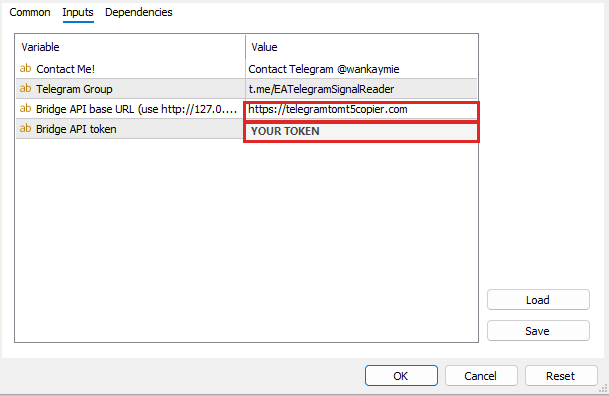
Enter your own license token from the dashboard. For Cloud + EA, enter https://telegramtomt5copier.com as the Bridge API base URL in the EA Inputs.
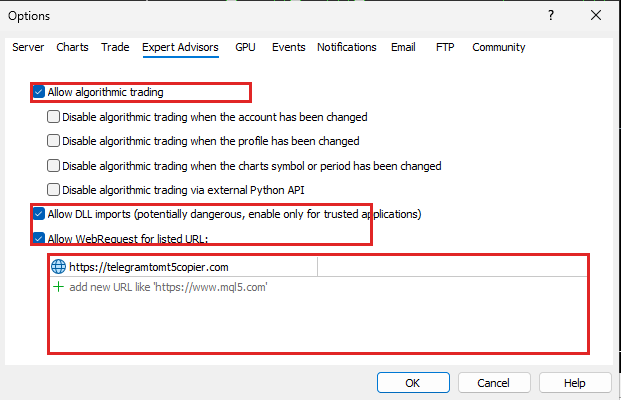
- In MT5, open Tools > Options > Expert Advisors.
- Enable Allow WebRequest for listed URL and add
https://telegramtomt5copier.com. It must match the Cloud URL used by the EA. - Allow algorithmic trading for the EA and enable the terminal's Algo Trading control.
- Keep MT5 connected to the broker and check the EA panel for Bridge: connected. Check the recent heartbeat or connection status in the dashboard as well.
The Cloud EA input screenshot and MetaTrader settings screenshot show the setup fields. Use your own token; do not share it in support screenshots. MetaQuotes explains the WebRequest allowed-URL setting.
Using Windows / VPS + EA instead? Follow that method's dashboard guide and use http://127.0.0.2 in both EA Inputs and the WebRequest list. Keep the Windows Client running beside MT5. Do not mix the local bridge URL with the Cloud + EA URL.
4. Connect Telegram and save the signal sources
On the dashboard's Telegram setup, choose Website as the listener for Cloud + EA. Connect the Telegram account that can access your signal sources, refresh the source list, select the required channels or groups, then save them.
Assign each selected source to the intended MT5 account and settings profile. A connected Telegram session alone does not select every channel for copying.
Use a redacted sample in the free Telegram signal format tester. Compare the symbol, direction, entry, stop loss and targets with the original message. The tester previews interpretation; it does not place a trade. Optional AI Recognition is available on Premium and Enterprise plans.
5. Match broker symbols and review lot, SL and TP rules
Check the exact instrument name in your broker's Market Watch. A signal may say GOLD while your broker lists XAUUSD, or your broker may use a suffix such as EURUSDm. These are naming examples, not trading instructions. Save the mapping that matches your account.
Review the demo account's lot-sizing rule, enabled layers and TP slots, SL/TP overrides and filters. Risk-based sizing needs a valid stop loss. Multiple enabled orders can create more exposure than one order, so check the total intended volume as well as each individual order.
6. Verify the first signal on your demo account
Use one clearly labelled test message from a source you control, routed only to the demo account. In dashboard Logs or Signal Journey, follow received → parsed → routed → EA pull → trade result.
Confirm the expected demo trade or pending order in MT5, including the symbol, direction, volume, entry, SL and TP. Bridge: connected confirms communication, not a successfully executed trade. Read rejected or skipped results before changing settings or retrying a message, and inspect existing orders to avoid unintended duplicates.
MT5 copier installed, but not working?
- EA missing from Navigator: check the
.ex5file, the receiving terminal'sMQL5/Expertsfolder and Navigator Refresh. - Bridge disconnected: check the active plan, your own token, the matching Cloud or local bridge URL and its WebRequest permission. Read MT5 Experts and Journal messages.
- Telegram connected, but no received signal: check source access, saved source selection and the receiving account assignment.
- Signal parsed, but no order: inspect the routing or trade-result reason. Check the actual broker symbol, market availability, volume, stop distances and configured risk or session filters.
- More orders than expected: inspect the enabled layers, TP slots and existing orders before retrying. Use the duplicate-order troubleshooting checklist.
The MT5 compatibility and execution checklist helps trace a failed stage. Signed-in users can also open Check my setup and the Cloud + EA Help Centre guide.
MT5 installation questions
Do I need a VPS to run the MT5 copier?
A VPS is optional for the EA route: you can use your own computer, but MT5 must remain open and connected with the EA running. For execution without your own running terminal, use your own MetaAPI account and its separately paid subscription.
Can I use an MT4 EA file in MetaTrader 5?
No. Download the MT5 .ex5 version for MetaTrader 5. Follow the MT4 copier instructions if your broker account uses MetaTrader 4.
Is creating a free account enough to start copying?
No. Free registration lets you create and verify an account. Copier access starts after your paid plan is confirmed; plans start at $9.90 USD/month. Your own MetaAPI subscription is a separate cost if you choose that execution method.
Ready to choose your method? Review the Telegram to MT5 copier page and copier plans, then return to these steps for your first demo setup.